Quickstart#
This page introduces the tecio API with four self-contained examples. For
installation and system requirements see Installation.
Examples#
1. Structured IJK Zone (1-D Line)#
The simplest possible file: a single ordered zone containing two variables
plotted against each other as a line. Dimensions are inferred from the array
shape — a 1-D array of length N produces an (N, 1, 1) zone.
import numpy as np
import tecio

x = np.linspace(0.0, 2.0 * np.pi, 256)
y = np.sin(x)

with tecio.open("line.szplt", "w", title="Sine Curve") as w:
    w.write_ijk_zone(
        title="sin(x)",
        variables=["x", "y"],
        data=[x, y],
    )
Reading the file back follows the same pattern:
with tecio.open("line.szplt", "r") as r:
    print(r.title)       # 'Sine Curve'
    print(r.variables)   # ['x', 'y']

    zone = r.zone[0]
    x_read = zone.variable[0].values   # NumPy array, shape (256, 1, 1)
    y_read = zone.variable[1].values
Note
Python objects are 0-indexed. The zone list and variable list on a
reader both use standard Python (zero-based) indexing: r.zone[0] is the
first zone, zone.variable[1] is the second variable.
TecIO inputs and outputs are 1-indexed. Whenever a function in
tecio.libtecio accepts a zone or variable index as an integer argument — for
example tec_zone_var_write_float_values(handle, zone=1, var=2, ...) — those
indices follow Tecplot’s Fortran-style one-based convention. The high-level
tecio.open API handles this translation automatically.
2. Unstructured Finite-Element Zones#
All five simple finite-element cell types supported by Tecplot are shown below
in a single file, one zone per element type. The node_map argument is a
(num_cells, nodes_per_cell) integer array of 1-based node indices.
import numpy as np
import tecio
from tecio.libtecio import ZoneType

with tecio.open("fe_cells.szplt", "w") as szlfile:

    # -- Write a FE line segment ---------------------------------------------
    x = np.array([0, 0.5, 1])
    y = np.array([0, 1, 0])
    nodes = np.array([[1, 2], [2, 3]])
    c = np.sin(2 * np.pi * x) * np.cos(2 * np.pi * y)

    szlfile.write_fe_zone(
        zone_type=ZoneType.FELINESEG,
        data=[x, y, c],
        node_map=nodes,
        title="FE_LineSeg",
        variables=["x", "y", "z", "c"],
        passive_vars=[False, False, True, False],
    )

    # --  Write a FE triangle ------------------------------------------------
    x = np.array([0, 1, 0, 1]) + 2
    y = np.array([0, 0, 1, 1])
    nodes = np.array([[1, 2, 3], [2, 4, 3]])
    c = np.sin(2 * np.pi * x) * np.cos(2 * np.pi * y)
    szlfile.write_fe_zone(
        zone_type=ZoneType.FETRIANGLE,
        data=[x, y, c],
        node_map=nodes,
        title="FE_Tri",
        variables=["x", "y", "z", "c"],
        passive_vars=[False, False, True, False],
    )

    #  -- Write a FE quadrilateral -------------------------------------------
    x = np.array([0, 0.5, 1, 0, 0.5, 1]) + 4
    y = np.array([0, 0, 0, 1, 1, 1])
    nodes = np.array([[1, 2, 5, 4], [2, 3, 6, 5]])
    c = np.sin(2 * np.pi * x) * np.cos(2 * np.pi * y)
    szlfile.write_fe_zone(
        zone_type=ZoneType.FEQUADRILATERAL,
        data=[x, y, c],
        node_map=nodes,
        title="FE_Quad",
        variables=["x", "y", "z", "c"],
        passive_vars=[False, False, True, False],
    )

    # -- Write a FE tetrahedron ----------------------------------------------
    x = np.array([0, 1, 0.5, 0.5, 0.5]) + 6
    y = np.array([0, 0, 1, 0.5, 0.5])
    z = np.array([0, 0, 0, 1, -1])
    nodes = np.array([[1, 2, 3, 4], [1, 3, 2, 5]])
    c = np.sin(2 * np.pi * x) * np.cos(2 * np.pi * y) * (1.0 + 0.1 * z)
    szlfile.write_fe_zone(
        zone_type=ZoneType.FETETRAHEDRON,
        data=[x, y, z, c],
        node_map=nodes,
        title="FE_Tet",
        variables=["x", "y", "z", "c"],
    )

    # --  Write a FE pyramid as degenerate FEBRICK ---------------------------
    x = np.array([0, 1, 1, 0, 0.5, 0.5]) + 8
    y = np.array([0, 0, 1, 1, 0.5, 0.5])
    z = np.array([0, 0, 0, 0, 1, -1])
    nodes = np.array([[1, 2, 3, 4, 5, 5, 5, 5], [1, 4, 3, 2, 6, 6, 6, 6]])
    c = np.sin(2 * np.pi * x) * np.cos(2 * np.pi * y) * (1.0 + 0.1 * z)
    szlfile.write_fe_zone(
        zone_type=ZoneType.FEBRICK,
        data=[x, y, z, c],
        node_map=nodes,
        title="FE_Pyramid",
        variables=["x", "y", "z", "c"],
    )

    # -- Write a FE prism as degenerate FEBRICK ------------------------------
    x = np.array([0, 1, 0.5, 0, 1, 0.5, 0, 1, 0.5]) + 10
    y = np.array([0, 0, 1, 0, 0, 1, 0, 0, 1])
    z = np.array([0, 0, 0, 1, 1, 1, -1, -1, -1])
    nodes = np.array([[1, 2, 3, 3, 4, 5, 6, 6], [1, 3, 2, 2, 7, 9, 8, 8]])
    c = np.sin(2 * np.pi * x) * np.cos(2 * np.pi * y) * (1.0 + 0.1 * z)
    szlfile.write_fe_zone(
        zone_type=ZoneType.FEBRICK,
        data=[x, y, z, c],
        node_map=nodes,
        title="FE_Prism",
        variables=["x", "y", "z", "c"],
    )

    # -- Write a FEBRICK -----------------------------------------------------
    x = np.array([0, 1, 1, 0, 0, 1, 1, 0, 0, 1, 1, 0]) + 12
    y = np.array([0, 0, 1, 1, 0, 0, 1, 1, 0, 0, 1, 1])
    z = np.array([0, 0, 0, 0, 1, 1, 1, 1, -1, -1, -1, -1])
    nodes = np.array([[1, 2, 3, 4, 5, 6, 7, 8], [1, 4, 3, 2, 9, 12, 11, 10]])
    c = np.sin(2 * np.pi * x) * np.cos(2 * np.pi * y) * (1.0 + 0.1 * z)
    szlfile.write_fe_zone(
        zone_type=ZoneType.FEBRICK,
        data=[x, y, z, c],
        node_map=nodes,
        title="FE_Brick",
        variables=["x", "y", "z", "c"],
    )
Note
After the first write_fe_zone call the variable list is locked in. Subsequent
zones must supply the same set of variables (or a subset via passive_vars).
The variables keyword only needs to be passed once — on the first write call,
or at tecio.open time.
The seven finite-element zone types supported by tecio are shown below, from
left to right: FELINESEG, FETRIANGLE, FEQUADRILATERAL, FETETRAHEDRON,
pyramid (degenerate FEBRICK), prism (degenerate FEBRICK), and FEBRICK.
Each zone contains two cells.
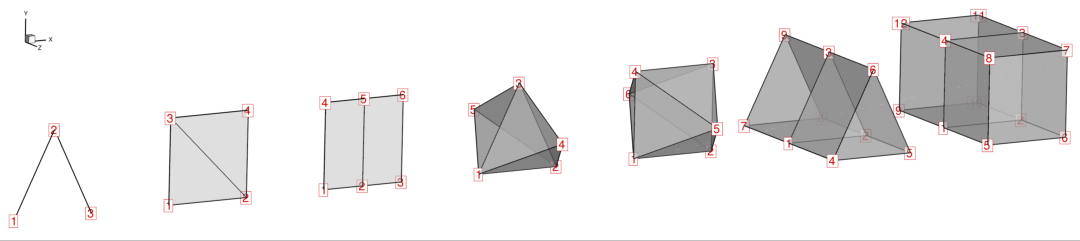
Node numbering (red) for each FE zone type. Node indices are 1-based and are
used directly in the node_map connectivity array passed to
write_fe_zone().#
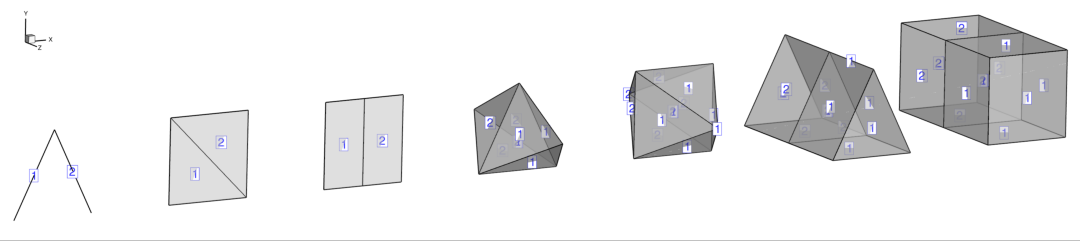
Cell numbering (blue) for each FE zone type. Cell indices correspond to rows
in the node_map array.#
3. Time-Dependent 2-D Field#
Transient datasets are written by assigning each zone a strand_id and
solution_time. Zones on the same strand animate together in Tecplot 360.
Grid coordinates that do not change between time steps can be shared from
the first zone to avoid writing duplicate arrays, which substantially reduces
file size for large grids.
import numpy as np
import tecio

# 2-D grid
nx, ny = 128, 128
x = np.linspace(0.0, 1.0, nx)
y = np.linspace(0.0, 1.0, ny)
X, Y = np.meshgrid(x, y, indexing="ij")   # shape (nx, ny)

times = np.linspace(0.0, 4.0 * np.pi, 60)

with tecio.open("transient.szplt", "w", title="Travelling Wave") as w:

    # Set dataset auxiliary data before the first zone
    w.add_auxdataset_dict({
        "Common.XVar": 1,
        "Common.YVar": 2,
        "Common.CVar": 3,
    })

    for i, t in enumerate(times):
        phi = np.sin(2.0 * np.pi * X - t) * np.cos(2.0 * np.pi * Y)

        if i == 0:
            # First zone: write grid coordinates and solution
            w.write_ijk_zone(
                title=f"t = {t:.3f}",
                variables=["x", "y", "phi"],
                data=[X, Y, phi],
                strand_id=1,
                solution_time=t,
            )
        else:
            # Subsequent zones: share x and y from zone 1, write phi only
            w.write_ijk_zone(
                title=f"t = {t:.3f}",
                data=[phi],
                var_sharing=[1, 1, 0],   # x←zone1, y←zone1, phi=new
                strand_id=1,
                solution_time=t,
            )
Reading a transient file works identically to a steady file — the zones are listed in the order they were written:
with tecio.open("transient.szplt", "r") as r:
    print(r.num_zones)           # 60

    # Solution times across all zones
    times_read = [r.zone[i].solution_time for i in range(r.num_zones)]

    # Grid is only stored in zone 0; later zones return None for shared vars
    phi_t0 = r.zone[0].variable[2].values    # shape (128, 128, 1)
    phi_t1 = r.zone[1].variable[2].values    # shape (128, 128, 1)
    x_shared = r.zone[1].variable[0].values  # None — shared from zone 0
4. Low-Level libtecio API#
The tecio.libtecio module exposes the TecIO C functions directly. Using it
gives full control over data types, zone creation options, and the write
ordering required by the SZL API. This example reproduces the 1-D sine curve
from Example 1 using the low-level SZL write functions.
import numpy as np
from tecio import libtecio
from tecio.libtecio import DataType, FileType, ValueLocation, ZoneType

x = np.linspace(0.0, 2.0 * np.pi, 256, dtype=np.float32)
y = np.sin(x)

# 1. Open a writer handle (returns an opaque C pointer)
handle = libtecio.tec_file_writer_open(
    filename="line_lowlevel.szplt",
    variables=["x", "y"],
    title="Sine Curve (low-level)",
    file_type=FileType.FULL,
)

# 2. Create a zone and get its 1-based index
izone = libtecio.tec_zone_create_ijk(
    handle,
    zone_title="sin(x)",
    imax=256,
    jmax=1,
    kmax=1,
    var_types=[DataType.FLOAT, DataType.FLOAT],
    value_locations=[ValueLocation.NODAL, ValueLocation.NODAL],
)

# 3. Write each variable by 1-based index (zone=1, var=1 / var=2)
libtecio.tec_zone_var_write_float_values(handle, izone, 1, x)
libtecio.tec_zone_var_write_float_values(handle, izone, 2, y.astype(np.float32))

# 4. Close and flush
libtecio.tec_file_writer_close(handle)
Note
SZL vs. classic API. The SZL functions (tec_file_writer_open,
tec_zone_create_ijk, tec_zone_var_write_*) return an explicit file handle
and allow variables to be written in any order after zone creation. Multiple
files can be open simultaneously.
The classic PLT functions (tecini142, teczne142, tecdat142, tecend142)
maintain a single implicit global context: only one file is active at a time
and data must be written in strict zone → variable order. Use the SZL API for
new code unless PLT format is specifically required.
Indexing Conventions#
Context |
Indexing |
Example |
|---|---|---|
Python reader objects ( |
0-based |
|
|
1-based |
|
|
1-based zone number |
|
|
1-based node indices |
|
The high-level tecio.open API handles the translation between Python
zero-based indexing and TecIO one-based indexing automatically. You only need
to think about one-based indices when calling libtecio functions directly or
when constructing var_sharing / node_map arrays.
Getting Help#
All public classes and functions have docstrings accessible via Python’s
built-in help() function:
import tecio

help(tecio.open)               # top-level open function
help(tecio.szl.Write)          # SZL writer class and all its methods
help(tecio.libtecio.ZoneType)  # enum values and descriptions
Full API documentation is available in the API Reference,
and runnable demos are provided in the demos/ directory of the repository.